How are marketers really using social media?

Today, all marketers in their role as brand stewards are considering the best ways to leverage the social media activity of consumers in order to drive business growth. Where once conferences and trade shows were the dominant venue for intellectual exchanges, marketers now also rely on social media to discuss social media.

Less than 1% of Web Site Visits Come from Social Media

One of social media's big selling points is the high degree of user engagement it generally produces -- but paradoxically this "stickiness" may also be a liability, as heavily-engaged users are also less likely to follow links leading to sites outside the social media universe. At least, that's the conclusion I draw from some interesting research findings just released by ForeSee Results.

Five More Social Trends To Excite You

I listened to all the social media chatter after last week's post on social media trends and I heard you loud and clear: five trends aren't enough. Brilliant social marketer that I am, I'll share five more. Or maybe I couldn't fit all 10 in the previous post and this is a disingenuous way to spin it. Either way, here are five trends marketers need to follow today.

More Proof That The (Social) Future Is Hard To Predict -- Or, Who Knew?

I've spent part of the week haunted by the specter of the Winklevii.You know the ones - the identical twins - immortalized in "The Social Network," who just can't give up the ghost on feeling they deserve more of Mark Zuckerberg's cajillions? Here's the Cliff Notes version of the beef they have to pick with Facebook, which was partly detailed in the somewhat true parts of the Oscar-nominated movie:

Is There Really Trouble @Twitter, Or Is It Just Different @Twitter?

In a world where last week almost seems like a decade ago, you can call me slow on the uptake for just getting around to reading Jesse Hempel's feature in Fortune, "Trouble @Twitter," a week after it published.

Hiển thị các bài đăng có nhãn Facebook. Hiển thị tất cả bài đăng

Thứ Ba, 30 tháng 8, 2011

2 in 3 Online Adults Use SocNets

2 in 3 Online Adults Use SocNets


Two-thirds of adult internet users (65%) now say they use a social networking site like MySpace, Facebook or LinkedIn, up almost 7% from 61% one year ago, according to [pdf] an August 2011 report from the Pew Internet & American Life Project. That’s more than double the percentage that reported social networking site usage in 2008 (29%), and about eight times the 8% who said they used social networking sites in 2005.
Looking at usage on a typical day, 43% of online adults use social networking, up 13% from 38% a year ago and more than triple the rate of 13% in 2008. Out of all the “daily” online activities that Pew polls about, only email (which 61% of internet users access on a typical day) and search engines (which 59% use on a typical day) are used more frequently than social networking tools.

Women, Young, Minorities among Top SocNet Users

pew-socnet-who-uses-aug-2011.JPG
Focusing on social networking usage by different demographic traits, the survey finds that women (69%) are about 15% more likely to use social networking sites than men (60%). In addition, 83% of 18-to-29-year-olds use social networking sites, about 2.5 times the 33% usage rate of adults 65 and older.
Differences by ethnicity are not quite as pronounced. Black, non-Hispanics have the highest rate (69%), which is 4.5% higher than the 66% usage rate of Hispanics and 9.5% higher than the 63% usage rate of white, non-Hispanics.
Social network usage by household income level shows some interesting trends. Adults earning $30,000 - $49,999 annually have the highest usage level (70%), closely followed by those earning more than $75,000 and less than $30,000 (68% each). Those in the middle income bracket of $50,000 - $74,999 have a notably lower usage rate of 63%.
Trends by education level follow a similar pattern, with high school grads (61%) having a distinctly lower usage rate than adults with less than a high school degree (a leading 68%), college grads (65%), and those with some college (67%). Furthermore, rural adults (61%) lag their suburban (65%) and urban (67%) peers.

Boomer Daily SocNet Use Booms

pew-socnet-age-aug-2011.JPG
The frequency of social networking site usage among young adult internet users was stable during the last year – 61% of online Americans in the 18-29 age cohort now use social networking sites on a typical day, compared with 60% one year ago. At the same time, those ages 30-49 have become somewhat more likely to use the sites on an average day; the frequency of social networking use among this age group grew a modest 18% (from 39% to 46%) in the past year.
However, among the Boomer-aged segment of internet users ages 50-64, social network usage on a typical day grew a rigorous 60% (from 20% to 32%). The frequency of use among the oldest group of internet users did not increase significantly in the past year.

SocNet Users Get Older

The average age of social network users rose between 2008 and 2010, according to data released in June 2011 by the Pew Research Center Internet & American Life Project. For example, the percentage of social network users age 18-22 fell 43%, from 28% to 16%.
In addition, the percentage of social network users age 23-35 dropped 20%, from 40% to 32%. Meanwhile, the percentage of users age 36-49 rose 18%, from 22% to 26%. Most significantly, the percentage of users age 50-65 more than doubled, from 9% to 20%.
In total, 52% of social network users in 2010 were 36 and up, a 58% increase from 33% in 2008.
About the Data: The Pew Research Center’s Internet & American Life Project conducted its Spring Tracking Survey from April 26 – May 22, 2011 among 2,277 adult internet users ages 18 and older, including 755 cell phone interviews.

7 Tips for Dealing With Upset Facebook Fans | Social Media Examiner

7 Tips for Dealing With Upset Facebook Fans | Social Media Examiner


What do you do when you’ve just received a less-than-complimentary Facebook wall post from someone who likes your business (or used to, so it seems)?
The customer could have a simple complaint, or be so upset he’s gone on the offensive, making sure you and the rest of your community knows he’s angry.
Your next steps are key to retaining not only the business of the angry customer, but the business of other fans who like your page as well.

#1: Respond no matter what

It’s vitally important that the complaints and issues your fans pose on your wall are addressed. Inactivity on your part will appear as though you’re trying to ignore the issue and sweep it under the rug. Being unresponsive does nothing more than incite more anger and increase the chance the user will come back with even more angry wall posts.
Moreover, your community can see that angry post. If you don’t reply, it appears as though you are unconcerned with customer support, which can be detrimental to your reputation.
A response that illustrates respect and understanding for customers’ concerns willindicate your intention to rectify any problems. By addressing this upset fan,Newegg is demonstrating that they value their fans’ opinions—even the negative ones.
Newegg
An upset fan who promises to shop Newegg less frequently still receives prompt, respectful customer service.

#2: Be patient and understanding

In dealing with upset fans, you must remember that you are closer to your industry, products and services than they are. What may seem like basic, common knowledge to you is often foreign to the end user.
Take a step back and put yourself in your customer’s shoes. This can go a long way in understanding why he or she is frustrated. It may not be your company’s fault that the customer is upset.
Whether or not the fault lies on your end, a simple apology will go a long way in keeping the customer’s business. Instead of trying to figure out where the blame lies,turn upset fans into loyal customers by making their experience better.

#3: Contact the Customer Privately

Sending a private message or email to the customer opens up more options for you to address his or her complaints. The goal here is to extend some sort of token letting the customer know you’re sorry he or she is dissatisfied with your company, and you’re willing to make it right. Whether that’s offering the number of the manager’s direct phone line or a discount off the next purchase, moving the conversation from public to private allows you to give the customer a personal touch that signals you care.
However, offering things like direct lines and special discounts publicly can lead to other people creating problems just to get that special treatment, so it’s best to keep these practices off the wall.
While Hayneedle’s customer shown below isn’t visibly upset about the damaged order, Hayneedle handles the situation perfectly, and contacts the customer privately to resolve the issue.
hayneedle
Hayneedle moves conversation with a customer from the Facebook wall to private messages to better help the customer.

#4: Consider asking the fan to remove the post

Say you’ve discussed the issue privately, any problems have been straightened out, and the faultfinder is, once again, your happy customer.
While your wall is an integral part of your web presence, the customer may be unaware of how important it really is to your reputation. If he or she is satisfied with the resolution you’ve reached and grateful for the time you’ve spent making things right, there’s nothing wrong with privately asking the person to remove the post. Most of the time, he or she will remove the angry wall post.

#5: Respond back to the original post

As a general rule, you, the Facebook page admin, should not remove negative posts.Not everyone is going to have a glowing review of your product or company. Social media users know this, and if they see nothing but positive comments, they’ll assume your company is deleting the bad comments.
If you don’t feel comfortable asking your customer to remove the post, you do have the option of publicly responding back to that post. Express happiness in the resolution you’ve reached and thankfulness for her business. Even a negative post can be a good thing, as long as the last comment is positive. Your reputation among your community will soar when they see how well you take care of your customers.
Zappos is shown below addressing a negative comment. The helpful attitude effectively nullifies any poor reflection on Zappos or their services.
zappos
Zappos responds quickly with understanding and a desire to create a better experience for their upset fan.

#6: Let your community respond

Letting your community respond for you is really the end result of all the earlier steps. It requires copious time, energy and patience with your fans, and a fantastic product. After you’ve engaged with your fans for a period of time by answering questions and offering support, you’ll notice that your fans will be more active on your page, even to the point of assisting each other.
What’s great about getting this community support is that there’s a genuine credibility when fans endorse your business for you. They become your eager virtual support agents, answering questions and solving problems before you have a chance to. But this is a level you can only achieve if you’ve nurtured and supported your community.
The Pampered Chef has built a fantastic online community of users who love the product so much, and who have been given such great support themselves, peers will answer each other’s questions before The Pampered Chef has to respond.
pampered chef
An outpouring of community support is the direct result of The Pampered Chef's top-notch customer service.

#7: The Last Resort

If the offended party is unreceptive to your customer service attempts, blatantly hostile and only active in your community to start arguments, banning the individual is a last-resort option. And anyone leveling expletives or racial slurs against your staff or fans should be banned. Your staff and your fans don’t deserve to be subjected to the abuse, and in the end, they will respect you more because you took the initiative.

Thứ Năm, 25 tháng 8, 2011

Finalists: Top 10 Small Business Facebook Pages 2011 | Social Media Examiner

Finalists: Top 10 Small Business Facebook Pages 2011 | Social Media Examiner: 


We received over 1400 nominations for our Top 10 Small Business Facebook Page contest.
The list of 20 finalists is pretty impressive! Take a look for yourself below.
The Judges: Our judges include Mari Smith(co-author, Facebook Marketing: An Hour a Day), Dave Kerpen (author, Likeable Social Media) and Michael Stelzner (author, Launch).


The Finalists (in alphabetical order)

How We’ll Pick the Winners

#1: Initial qualification:
A page must have a compelling Facebook presence, must have been nominated multiple times by multiple individuals and must be regularly updated. If someone nominated more than one page, only the first nomination was counted.
#2: Final winner selection:
Quality of Facebook page: Our judges will examine and score the Facebook page of each finalist (65% of decision).
Fan engagement: Facebook pages that have regular comments from readers are another sign of a healthy page. In addition, the number of nominations for a specific page plays a part in this (35%).
Congratulations to the finalists! We’ll announce the winners here soon!
What do you think about these Facebook pages? Leave your comments in the box below…

Thứ Ba, 23 tháng 8, 2011

4 Tips for Effective Facebook Community Management | Social Media Examiner

4 Tips for Effective Facebook Community Management | Social Media Examiner


Do you manage a Facebook page?
Are you looking for an easier way to manage your tasks?
In this article I’ll share four tips that will increase your value to your community.

About Community Managers

The role of community manager has been around much longer than Facebook. In fact, I like to think of the community manager as a modern-day Andy Griffith. Youhelp people out, give advice, get to know the neighbors and occasionally keep the peace and lay down the law. The analogy isn’t perfect, but you get the idea.
You may start out as the sole admin on your Facebook page, but as your business and Facebook presence grow, you may need help (after all, Facebook is open 24-7). You may want to hire a community manager to facilitate the discussions, postings and moderation.
Make sure you take a look at our How to Select a Facebook Community Managerpost to give you tips on the selection process. Or you may just want to have multiple administrators from within your marketing team (hint: use the post mentioned above as a guide to make sure you’re picking the right team members).
Whatever your team looks like (just you or a team of several), keep these four tips in mind to help continue to grow your Facebook community.

#1: Be a resource

One of the top reasons people will post on your page is to ask a question or get some information. Respond to these questions in a timely manner. Even if you don’t have an answer to the question, people will still feel that you did your best to help.


If you don’t respond, you appear not to care and your community will go elsewhere.
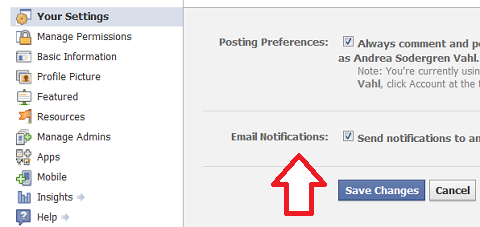
You don’t have to hang out on Facebook all day watching your wall, just make sure you have the notifications turned on so that you will get an email when you get a post. To check your notifications setting for your Facebook page, go to Edit Page and Your Settings to make sure you have email notifications turned on.

Also, make sure you are posting useful information—tips, links to articles, free resources. You can’t build a community around your sales messages. Think about what is helpful (or fun!) for your community.

#2: Respond and engage

Along the same lines of being a resource, you want to make sure you are responding to your community.
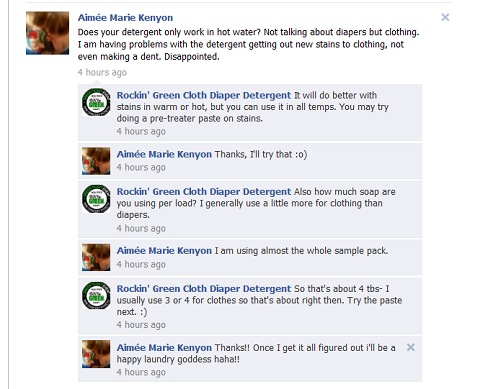
If someone takes the time to say how wonderful you are on your Facebook page, thank her, for goodness sake! If a customer was saying how much he loved your store while he was talking to you, you wouldn’t just stare at him. You would say thank you.


A big goal of your page is to encourage conversation. The more posts on your page, the more you take advantage of the viral nature of Facebook. Your role as community manager is to create a safe place for people to talk and communicate with you.
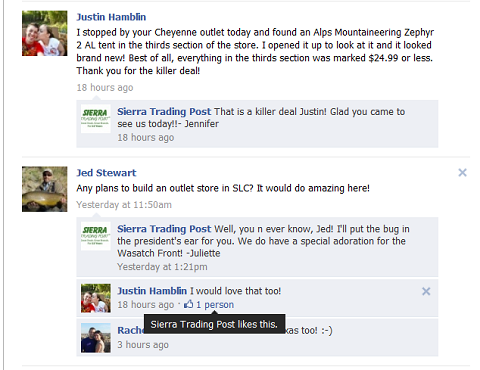
Sierra Trading Post came up in several different conversations as a brand that is doing Facebook right and managing their page well. When you respond to posts, word gets out.

#3: Moderate

Occasionally it may be necessary to issue some warnings, delete spam or step in to a discussion that is becoming contentious.
As a community manager, you will need to be present and make sure people are playing nice. Just because Facebook is a public space doesn’t mean that you can’t have rules set up for your section of the sandbox. You may want to have those rules posted on a separate tab or within the Info area.


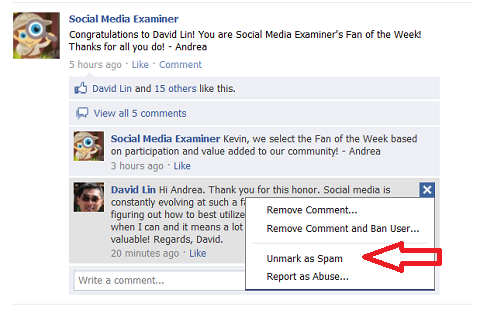
Feel free to delete posts that are spam and mark them as such. If spammers keep coming back, you can ban them from your page. They will not be able to comment or post again.
You’ll also have to watch when comments get marked as spam that aren’t actually spam. Facebook usually does this if someone posts a link within a comment thread or sometimes a comment is marked as spam for no apparent reason. You will see that a comment is marked as spam when it a shade of gray versus the other comments, which are a shade of blue (yes, I know it’s not very obvious!).

If someone’s post did get marked as spam, others visiting your page or commenting on the thread will not be able to see that post until you Unmark it or Remove it, whichever action is more appropriate.

#4: Measure

As with any marketing endeavor, make sure you measure your progress. Watch not only the growth of your community but the posts that are getting the most interaction.
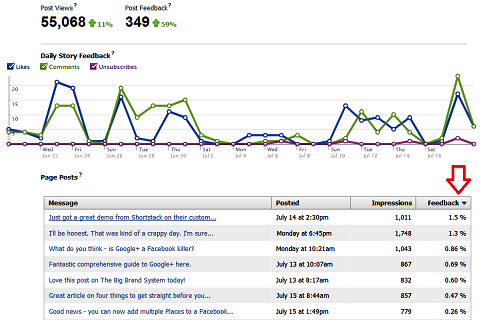
Click Insights and Interactions to drill down to the Page Post scores. Sort by the Feedback column to watch which posts are the most popular. The Feedback score is the ratio of the total number of Likes and Comments over the total times the post was seen (Impressions).
The Feedback scores on the individual Page Posts will not be stored long-term like the overall stats such as number of Likes and Comments, so make sure you are watching this weekly.


Although measuring, connecting and moderating are all part of the community manager’s job, the main thing is to have fun. If you enjoy your community and want the best for your community, that sentiment will show through and ultimately determine your success.
What do you think? What are your best tips for encouraging community growth and becoming a more effective Facebook community manager? Leave your comments in the box below.

Twitter Delicious Facebook Digg Stumbleupon Favorites More