How are marketers really using social media?

Today, all marketers in their role as brand stewards are considering the best ways to leverage the social media activity of consumers in order to drive business growth. Where once conferences and trade shows were the dominant venue for intellectual exchanges, marketers now also rely on social media to discuss social media.

Less than 1% of Web Site Visits Come from Social Media

One of social media's big selling points is the high degree of user engagement it generally produces -- but paradoxically this "stickiness" may also be a liability, as heavily-engaged users are also less likely to follow links leading to sites outside the social media universe. At least, that's the conclusion I draw from some interesting research findings just released by ForeSee Results.

Five More Social Trends To Excite You

I listened to all the social media chatter after last week's post on social media trends and I heard you loud and clear: five trends aren't enough. Brilliant social marketer that I am, I'll share five more. Or maybe I couldn't fit all 10 in the previous post and this is a disingenuous way to spin it. Either way, here are five trends marketers need to follow today.

More Proof That The (Social) Future Is Hard To Predict -- Or, Who Knew?

I've spent part of the week haunted by the specter of the Winklevii.You know the ones - the identical twins - immortalized in "The Social Network," who just can't give up the ghost on feeling they deserve more of Mark Zuckerberg's cajillions? Here's the Cliff Notes version of the beef they have to pick with Facebook, which was partly detailed in the somewhat true parts of the Oscar-nominated movie:

Is There Really Trouble @Twitter, Or Is It Just Different @Twitter?

In a world where last week almost seems like a decade ago, you can call me slow on the uptake for just getting around to reading Jesse Hempel's feature in Fortune, "Trouble @Twitter," a week after it published.

Hiển thị các bài đăng có nhãn Linkedin. Hiển thị tất cả bài đăng

Thứ Tư, 21 tháng 9, 2011

5 Simple Steps for Improving Your LinkedIn Visibility | Social Media Examiner


Are you wondering how to get the most from LinkedIn? Over the last few months, the LinkedIn network has made upgrades and undergone changes.
If you already have a profile created on LinkedIn, it’s a great time to revisit and refresh your presence!
Or if you’re just wondering how to get started, these 5 simple steps will help you make the most of your time and effort!

Why LinkedIn?

LinkedIn is the largest professional social network online today, with over 100 million professional users. The average household income of LinkedIn users is over $88,000 per year, which outpaces the average income for the readership of the Wall Street JournalForbes and Business Week!
If you are a professional or a business owner, you can’t afford to miss out on the opportunity to build relationships with potential customers, clients, partners and peers on LinkedIn. It’s a powerful audience that you can engage, interact with and influence.

#1: Complete your LinkedIn “profile box.”

When visitors first land on your LinkedIn profile, a box displaying your profile highlights fills the screen. Given the importance of first impressions, the information in your “profile box” should be complete, current and optimized.
This is your best chance to make a good impression. In many cases, someone may read through your entire profile, but most people are going to get the information they need from your profile box.
linkedin
Here are the steps to complete your LinkedIn Profile.
Upload a professional image. This is your very best opportunity to make a great first impression and is essential to attracting connections. No professional photo? No credibility.
Create a compelling headline. You only have 120 characters at the top of your profile to describe who you are, whom you serve and how you help. Use brief, descriptive, compelling keywords so the right professionals on LinkedIn can discover you. Focus on terms that your target markets are more likely to search for. What language do they use? Make your headline text compelling, but use words that resonate with your market.
List your current position and at least two past positions. If you don’t list at least two past positions, your profile won’t be considered “complete,” which can mean missed opportunities to be discovered by prospective clients and customers. Make sure to describe each of your roles in depth, and again use those keywords that will resonate with your target markets! It is also okay to list two or three positions that describe your current role, as I have done in my own profile.
Add your education information. List colleges and the high school you attended in this area. Why? One of the primary search tools within LinkedIn is the ability to locate people with whom you attended school. This is a potential connection point that can open doors for you.
Customize your “website” listings. Under the Websites section of your LinkedIn profile, you can have up to three listed. Choose the “Other” option when setting up each of these links and describe the links to your brand with relevant terms. For example, rather than using the phrase “my website,” I use “Smart Social Pro Blog.” Not only is this more descriptive, it also gives me a better opportunity to rank for those keywords in search.
Include a link to your Twitter profile. Add your Twitter handle to your LinkedIn profile. Visitors to your profile can now follow you on Twitter directly from within your profile box! LinkedIn and Twitter are tightly integrated. You can share your tweets as LinkedIn status updates (best practice: add #in to the end of specific tweets rather than choosing to send all tweets to LinkedIn), and you can share LinkedIn status updates as tweets!
Edit your “vanity” LinkedIn URL. An example ishttp://www.linkedin.com/in/stephaniesammons. This will enable your LinkedIn profile link to show up in search results under your name on all the major search engines! It is important to claim those results for your name as they provide a gateway into your personal brand.
Following these seven tips will ensure that you put your best foot forward with a comprehensive snapshot of who you are, what you do and where people can learn more about you. Your LinkedIn profile should serve as one of your most valuable professional digital assets.

#2: Use keywords within your profile summary section

The summary section on your LinkedIn profile is where you have the most flexibility toexpand upon who you are, whom you serve and how you help your clients. Although this section is not as visible as your “profile box,” it’s still important.
summary
Write the text in your summary section in the first person, as if you were talking directly to potential clients. Begin with “My name is…” Why? Because your name is a keyword, and this provides a simple introduction to your story. Your summary section should include keywords that describe how you help your clients in language that resonates with them! Try to stay away from industry jargon if possible. Also, don’t stuff your summary section with keywords. Simply use effective keywords and phrases where they fit.
Hint: The “specialties” section of the summary is a great place to list your areas of expertise using descriptive keywords.

#3: Leverage your existing natural network

Your existing contacts—your “natural” network—can provide a rich online networking experience and can help you quickly ramp up your visibility. This foundation network is key to creating a powerful presence on LinkedIn!
To uncover all of your connection opportunities, go to “Add Connections” in your navigation menu, which is listed under “Contacts.”
leverage
Thoroughly review LinkedIn’s connection channels.
There are four natural connection channels provided by LinkedIn. Make sure to go through all four connection channels to make sure you find all potential connections who can be a part of your network.
Regardless of how many connections you may already have on LinkedIn, it’s worth your while to go through this exercise monthly because membership growth continues to be very strong on LinkedIn!
see who you know
  1. Send a LinkedIn invitation to connect to existing contacts though the “Add Connections” feature.
  2. Review colleagues from your current and past work experience and send invitations to connect.
  3. Find classmates from high school and college to connect with.
  4. Review the “People You May Know” list. This is LinkedIn’s connection suggestion engine!

#4: Focus on timely and relevant status updates

LinkedIn is a professional business network; therefore, it’s busy during business hours! You should strive to be visible and valuable during that time. Your status updates should add value to your target markets.
A best practice is to update your status two to three times daily. Also, spread out your updates rather than posting them all at once.
A fantastic tool for adding value in your industry is to take advantage of LinkedIn Today. This is LinkedIn’s top news tool available right there inside the network. You can customize your news updates by industry and easily share relevant stories with your connections. Top news is surfaced by the people, not by an editorial staff!Learn how to use LinkedIn Today to find popular content.
linkedin today
See articles shared by your connections, save articles and follow industries.

#5: Join and participate in groups

LinkedIn Groups recently got a major upgrade with the new LinkedIn mobile application. You can now participate in group discussions on the go. This is a great way to remain visible and valuable in your target markets.
Strive to review and participate in group discussions at least once per week. You can join up to 50 groups, but your time will be best spent focusing on three to five at most. Otherwise it will be difficult to keep up with all of the conversations.
groups
By visiting the “Groups” tab on your LinkedIn navigation menu, you can easily find groups to join, access existing groups that you belong to, review and follow existing discussions that you are a part of, and view “groups you may like” suggestions from LinkedIn. In addition, you can use the LinkedIn search function to find groups.
Join groups that are relevant to your business and target markets. For example, if you have a local business, look for groups that are organized around where you live or work! Consider joining alumni groups, peer groups and groups that are organized around professional and personal topics that you are most interested in.
Lastly, think about groups where your target markets might be hanging out so you can find ways to be creatively visible and valuable to them with the resources and insights you share.
Share relevant, resourceful, rich content with your groups that can help other members. Ask questions and respond to commentsLearn more about effectively participating in LinkedIn Groups.

Final Thoughts

There are so many features and tools available with LinkedIn. It is essentially a networking treasure chest for any businessperson, filled with opportunities to deepen existing relationships, meet new professionals and add value to members of your target markets. To take advantage of all of these opportunities, it is important to spend time learning as much as you can.
I hope that these five steps will help you maximize value and minimize time as you ramp up your LinkedIn presence.

ABOUT THE AUTHORStephanie Sammons
Stephanie Sammons is founder and CEO of Wired Advisor, a turn-key blogging and social media platform for financial professionals.

Thứ Ba, 30 tháng 8, 2011

2 in 3 Online Adults Use SocNets

2 in 3 Online Adults Use SocNets


Two-thirds of adult internet users (65%) now say they use a social networking site like MySpace, Facebook or LinkedIn, up almost 7% from 61% one year ago, according to [pdf] an August 2011 report from the Pew Internet & American Life Project. That’s more than double the percentage that reported social networking site usage in 2008 (29%), and about eight times the 8% who said they used social networking sites in 2005.
Looking at usage on a typical day, 43% of online adults use social networking, up 13% from 38% a year ago and more than triple the rate of 13% in 2008. Out of all the “daily” online activities that Pew polls about, only email (which 61% of internet users access on a typical day) and search engines (which 59% use on a typical day) are used more frequently than social networking tools.

Women, Young, Minorities among Top SocNet Users

pew-socnet-who-uses-aug-2011.JPG
Focusing on social networking usage by different demographic traits, the survey finds that women (69%) are about 15% more likely to use social networking sites than men (60%). In addition, 83% of 18-to-29-year-olds use social networking sites, about 2.5 times the 33% usage rate of adults 65 and older.
Differences by ethnicity are not quite as pronounced. Black, non-Hispanics have the highest rate (69%), which is 4.5% higher than the 66% usage rate of Hispanics and 9.5% higher than the 63% usage rate of white, non-Hispanics.
Social network usage by household income level shows some interesting trends. Adults earning $30,000 - $49,999 annually have the highest usage level (70%), closely followed by those earning more than $75,000 and less than $30,000 (68% each). Those in the middle income bracket of $50,000 - $74,999 have a notably lower usage rate of 63%.
Trends by education level follow a similar pattern, with high school grads (61%) having a distinctly lower usage rate than adults with less than a high school degree (a leading 68%), college grads (65%), and those with some college (67%). Furthermore, rural adults (61%) lag their suburban (65%) and urban (67%) peers.

Boomer Daily SocNet Use Booms

pew-socnet-age-aug-2011.JPG
The frequency of social networking site usage among young adult internet users was stable during the last year – 61% of online Americans in the 18-29 age cohort now use social networking sites on a typical day, compared with 60% one year ago. At the same time, those ages 30-49 have become somewhat more likely to use the sites on an average day; the frequency of social networking use among this age group grew a modest 18% (from 39% to 46%) in the past year.
However, among the Boomer-aged segment of internet users ages 50-64, social network usage on a typical day grew a rigorous 60% (from 20% to 32%). The frequency of use among the oldest group of internet users did not increase significantly in the past year.

SocNet Users Get Older

The average age of social network users rose between 2008 and 2010, according to data released in June 2011 by the Pew Research Center Internet & American Life Project. For example, the percentage of social network users age 18-22 fell 43%, from 28% to 16%.
In addition, the percentage of social network users age 23-35 dropped 20%, from 40% to 32%. Meanwhile, the percentage of users age 36-49 rose 18%, from 22% to 26%. Most significantly, the percentage of users age 50-65 more than doubled, from 9% to 20%.
In total, 52% of social network users in 2010 were 36 and up, a 58% increase from 33% in 2008.
About the Data: The Pew Research Center’s Internet & American Life Project conducted its Spring Tracking Survey from April 26 – May 22, 2011 among 2,277 adult internet users ages 18 and older, including 755 cell phone interviews.

Thứ Ba, 23 tháng 8, 2011

How to Use LinkedIn Mail to Connect With Your Contacts | Social Media Examiner

How to Use LinkedIn Mail to Connect With Your Contacts | Social Media Examiner


Have you used LinkedIn Mail?
It represents a powerful way to stay in touch with important people (when used properly).
Keep reading to learn how to keep in touch with prospects and customers with LinkedIn Mail.

Why Use LinkedIn Mail?

LinkedIn Mail is probably one of the most underutilized parts of the LinkedIn platform, but if used correctly, it is one that can be extremely beneficial in growing not only your business connection base, but also your business.
You may already have a great network, but how often do you really connect with those people, nurture your relationships with them or put yourself on their radar? By using LinkedIn Mail or message facilities well, you can do just that.
Here’s how.

#1: Composing your message

Let’s look at composing a message to a group of connections. LinkedIn will allow you to send a message to up to 50 connections at any one time, which I assume is a safeguard against spammers. The 50-recipient cutoff just means that you will need to send your messages in batches, which spammers generally don’t want to bother with.
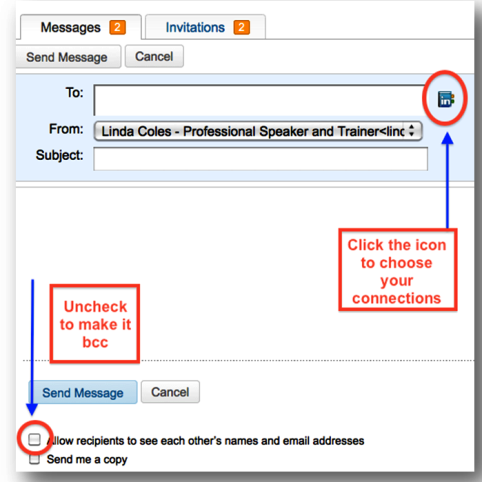
To send a message to one or many, first go to your inbox and click Compose Message.

The thing to remember here is to uncheck the box to ensure you don’t share your connections’ email addresses with everyone else you send the message to. It becomes a blind carbon copy very much like your regular email software.
Next you click on the blue LinkedIn icon over on the right to see all of your connections and to select to whom you would like to send your message.
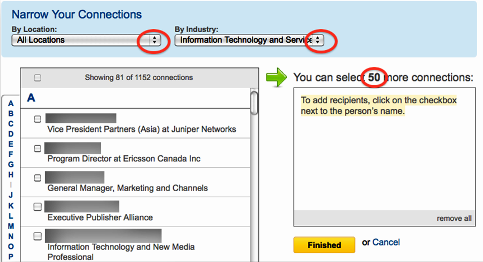
From there, you then have the choice of sending a message to selected connections in a certain location or industry. This is particularly helpful if your message is really only going to be of interest to certain connections who are accountants or Internet marketers, for example.

To select the connections you want, simply tick the relevant box, which will then filter across into the box on the right. You’ll see the number of connections you can continue adding as the “50″ counts down to zero.
When your connections have been added, you’ll be directed back to the message page where you started.

#2: Message content

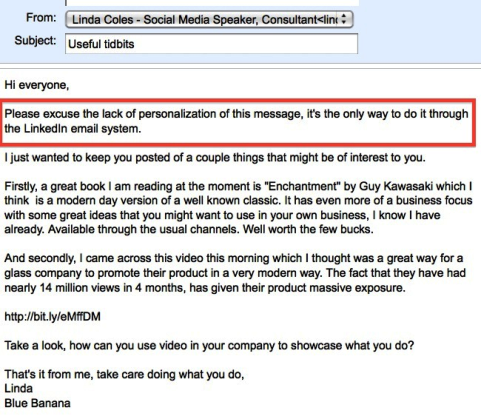
Your message should contain value (like all of the content you put on your website). What can you share with your connections that will be of value to them? This is where you need to put your thinking cap on and turn things around from what you may be currently sending out in your regular newsletters.
Some examples might include:
  • A link to a great business book you’ve just finished reading
  • An event that’s taking place that they may not have heard about, such as Guy Kawasaki presenting in town
  • A link to a great website that you’ve recently discovered
  • An industry article that’s relevant to them

Add value in some small way and they will love you for it. That’s what building relationships online is all about, adding value to someone’s world and being remembered for it. It’s not simply an excuse to send an email about all of the wonderful things you and your company can do for them. That is definitely not interesting or valuable.

#3: How often should you message?

There’s no right or wrong answer here, but be careful not to overdo it. I message every 3 months or so, but if I come across something extremely relevant to a connection, I will pass that on.
It also depends on your relationship with that connection, how well you know him or her, because some connections you don’t know well may find it a bit intrusive.

#4: To export or not to export?

Personally, I don’t think you should export your connections into another email program for three reasons:
  1. The receiver of the email may be unfamiliar with your newsletter and indeed the content may not be relevant, and so it will be seen as spam.
  2. By sending your message through the LinkedIn platform, the receiver knows where they know you from and can simply click on your name for further information about you if they want to.
  3. Your connection may feel “sold out” if they see you have imported them into your email database.
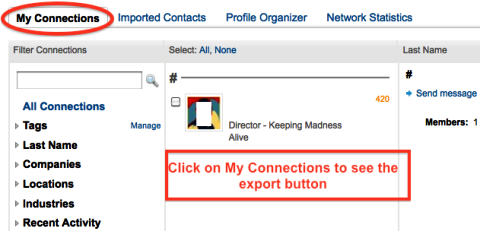
If you do decide to export them, here’s how. Click on Contacts, then My Connections and look for the Export Connections link at the bottom right.
So what is sending a message to your contact base going to achieve if all you send is a quick note about a handful of things that you feel might be of interest and want to share with them?
You have put yourself back on their radar! Depending on what you have put into your email and how relevant it is to them, you will get responses back, even if it is just to say thanks. This again gives you the opportunity to build on a relationship that could be in its early stages, or build on one that you have been nurturing for a while.
Tip: Check these two articles out on more ways to expand your network with LinkedIn Company Search and how to develop meaningful LinkedIn Connections.
What techniques do you use to keep in touch with your connections? Do you have any to add? Leave your comments in the box below.

Twitter Delicious Facebook Digg Stumbleupon Favorites More